
Openterface MiniKVM Keyboard and Mouse Not Working Issues Root Cause Analysis
Over the past month, a number of users have reported intermittent issues with Openterface, most commonly involving keyboard and mouse instability. We want to share a transparent and detailed technical explanation of what happened, how we identified the root cause, and what we have done — and are still doing — in response.
First Production Batch: Stable and Well-Received
During our crowdfunding campaign, we produced the first batch of 4,000 Openterface units.
This batch went through our full internal QA process, and overall quality was very solid. Only a small number of issues were reported, and the vast majority of users were satisfied with the stability and usability of the product.
This gave us confidence that both the hardware design and the production process were sound.
Second Batch: Same Design, Same Factory, “Same” Components
After the first batch sold out, we produced a second batch of 500 Openterface MiniKVM units, manufactured in the same factory and using components sourced from the same suppliers.
One key component involved is the CH213K ideal diode, sourced from WCH.
In Openterface MiniKVM, this component is used to protect and isolate the USB power paths between the Host side and the Target side, preventing reverse current and unintended power injection.
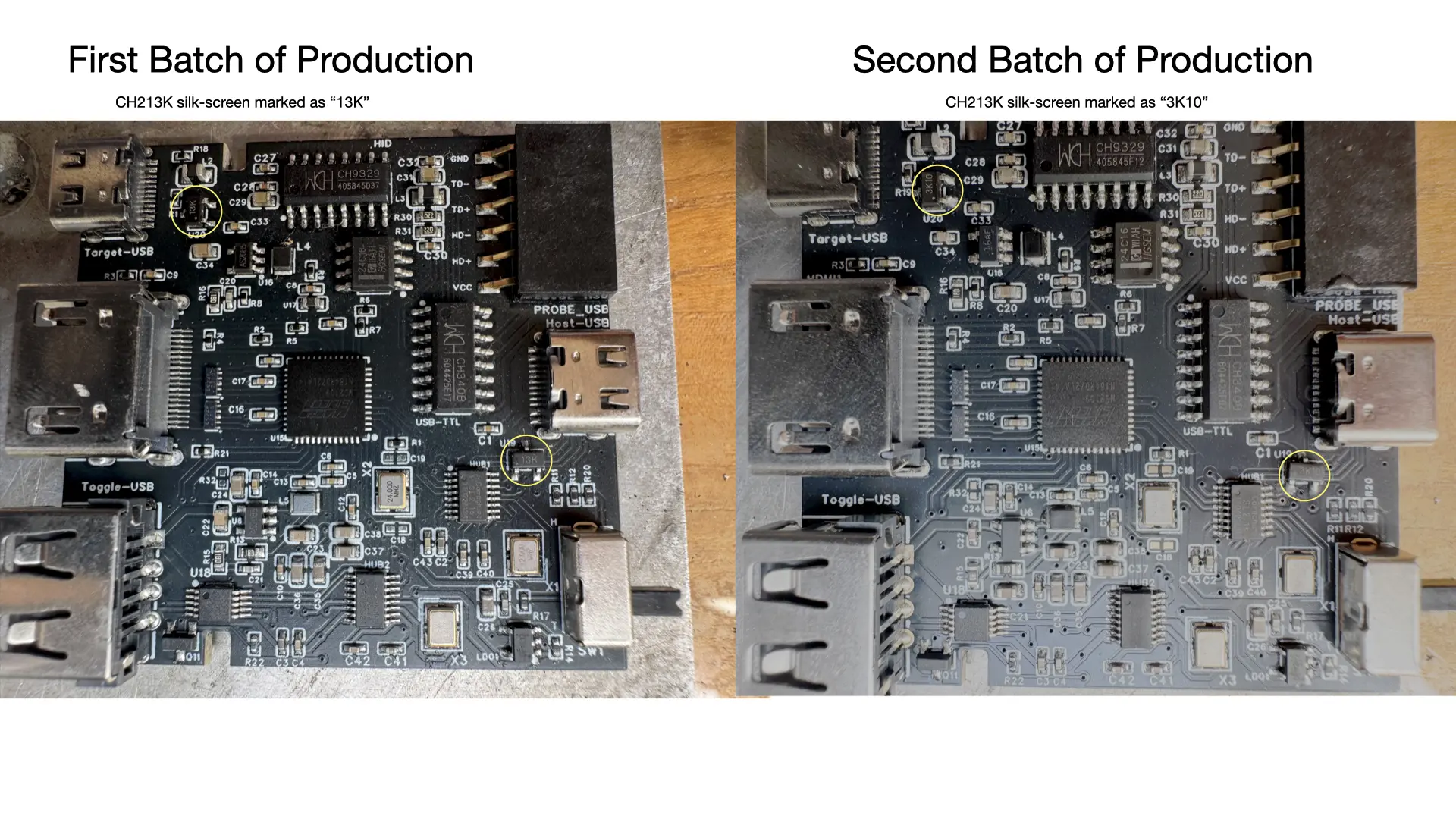
In this second batch, the silk-screen marking on the CH213K changed:
- First batch: “13K”
- Second batch: “3k10”
Because the part number, supplier, and published specifications were unchanged, we treated this as a routine batch or marking update and did not initially consider it a risk factor.
QA Results: Subtle Signals That Were Easy to Miss
We ran the same QA procedures as with the first batch.
The overall defect rate increased slightly but remained within what we considered an acceptable range. No single failure mode stood out clearly, and the results did not point to a specific component or design issue. In hindsight, this subtle degradation was an early signal that we did not investigate deeply enough.
User Reports Triggered Deeper Investigation
Starting last month, we began receiving an increasing number of user reports describing keyboard and mouse not working as expected. A notable characteristic of these reports was that the issue appeared to depend on variables such as:
- The host computer
- The target computer
- The USB cable being used
This variability suggested a power-path edge case, rather than a firmware or USB protocol problem. We therefore started a systematic comparison of all factors that had changed between production batches.
Through this process, we identified the CH213K ideal diode with the “3k10” marking as the common factor across affected units.
Root Cause: Low-Probability, Environment-Dependent Power Instability
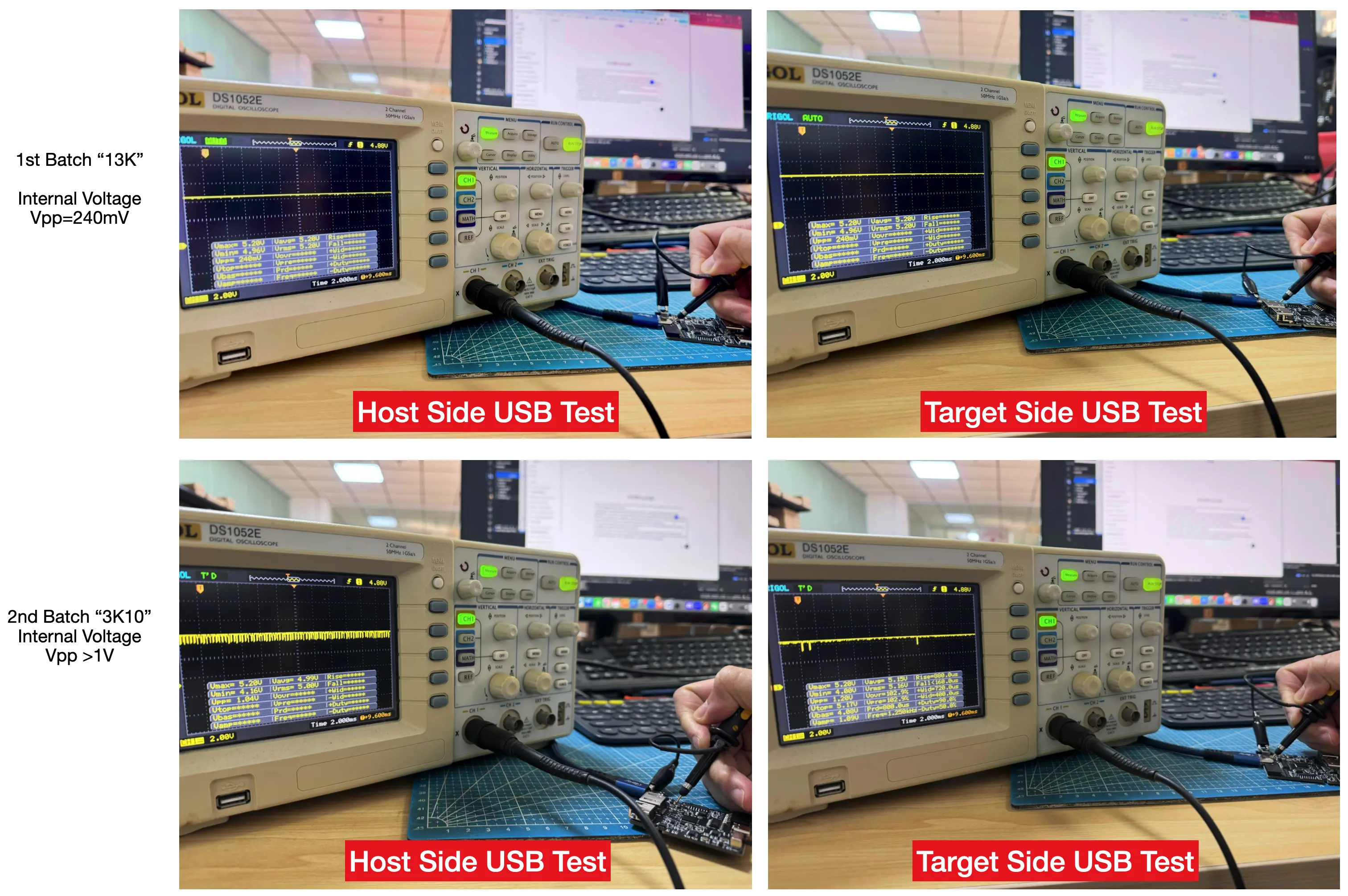
Through voltage measurements and comparative testing, we observed the following behavior:
- Units using the older “13K” ideal diode:
- Internal USB voltage remains stable across all tested hosts, targets, and cables.
- Units using the newer “3k10” ideal diode:
- In most cases, internal voltage remains stable and the device operates normally.
- However, based on user reports and follow-up testing, a small percentage of units (within ~5%) can experience internal voltage instability under certain combinations of host devices and USB cables.
This behavior is not deterministic and does not occur consistently across all setups, which explains why it was difficult to reproduce during standard QA testing. Nevertheless, at our scale, this incidence rate is significant and required immediate investigation.
Because the CH213K sits directly in the USB power path, voltage instability at this point can propagate downstream and affect USB HID behavior, resulting in intermittent keyboard or mouse failures.
Although both components are labeled CH213K, real-world behavior under varying USB power conditions appears to differ between these markings or internal manufacturing revisions.
Validation: Restoring Stability with Additional Output Capacitance
To validate our hypothesis, we introduced a targeted hardware change:
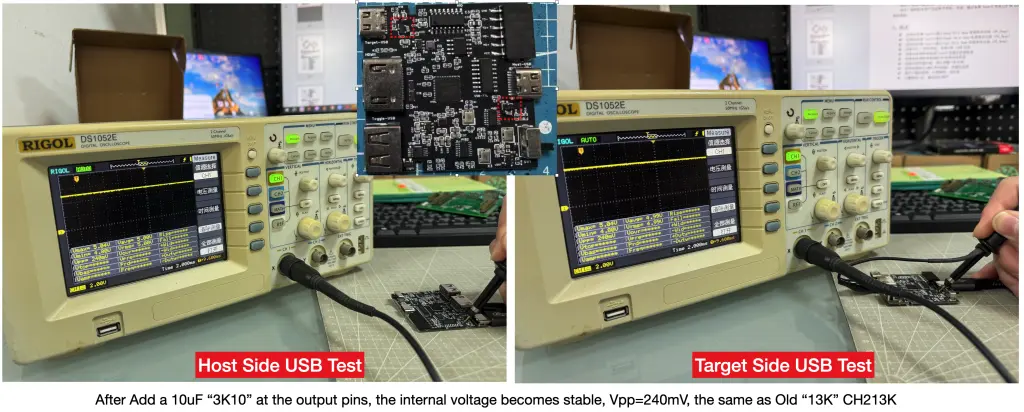
- Adding a 10 µF capacitor at the output of the CH213K ideal diode.
With this capacitor in place, internal voltage stability was restored across all previously problematic configurations. Keyboard and mouse behavior returned to normal, confirming that the issue was power-stability-related, rather than caused by firmware or USB logic.
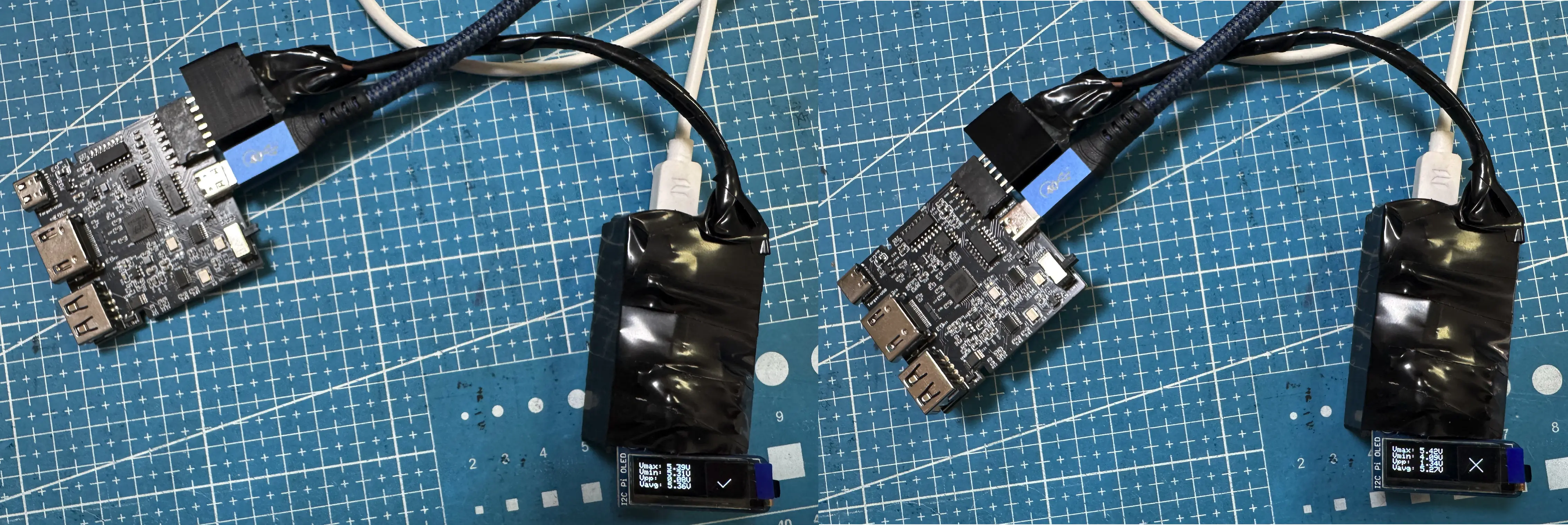
In addition, we have developed a quick QA validation tool based on ESP32 to measure Vpp (peak-to-peak voltage ripple) on MiniKVM units without requiring an oscilloscope. This allows our QA engineers to quickly and consistently check power stability during production and re-inspection, even outside a lab environment. By lowering the tooling and skill barrier for voltage-quality checks, we can screen all units more thoroughly and reliably, including edge cases that are difficult to catch with functional testing alone.
What We Have Done for Affected Users
In parallel with the technical investigation and fix, we focused on minimizing user impact and improving support efficiency:
- Cross-platform self-diagnostics tool
We developed a self-diagnostics tool for macOS, Windows, and Linux. This tool helps users quickly determine whether their keyboard or mouse instability is related to this issue and allows them to report the results directly to us.
For confirmed cases, we send a replacement unit immediately, without requiring users to go through lengthy distributor-side verification procedures. - Pause in sales and proactive hardware fix
We temporarily stopped shipping all existing stock once the issue was confirmed. We ship new batch of inventory now includes the capacitor-based fix to Crowd Supply, ensuring that ongoing and future sales are not affected by this low-probability but real issue. - Live technical support for faster resolution
For users who have difficulty diagnosing the issue, we offer live calls to walk through the checks together. This avoids long back-and-forth email exchanges and allows us to identify and resolve problems much more quickly.
Lessons Learned
This incident reinforced several important lessons for us:
- Even when part numbers remain unchanged, power-path components can exhibit subtle behavior differences between batches or internal revisions.
- Small increases in QA failure rates can be early indicators of deeper issues.
- USB power environments vary widely in the real world and are difficult to fully replicate in controlled testing.
- Fast, human-to-human support matters just as much as technical fixes when issues do occur.
Our Commitment Going Forward
We take full responsibility for this issue and for not identifying it earlier. Transparency matters to us, and we believe our users deserve a clear and honest technical explanation.
Going forward, we are:
- Updating the hardware design to improve USB power-path stability margins.
- Strengthening validation and characterization of power-path components, even when part numbers remain unchanged.
- Using an ESP32-based quick QA tool that enables QA engineers to measure Vpp without an oscilloscope, making power-stability checks faster, more repeatable, and easier to scale across production.
- Refining QA thresholds and test coverage to better catch low-probability, environment-dependent issues.
If you believe your unit may be affected or have questions about your specific setup, please contact us at support@openterface.com— we are committed to supporting you and making this right.
Thank you for your patience, your feedback, and your continued trust in Openterface MiniKVM.
Best regards,
Openterface Team | TechxArtisan