
Why the Physical Format of KVM-GO Looks the Way It Does
A Behind-the-Scenes Story
From the beginning, Openterface has always been about creating real-world tools. Not showpieces. Not gimmicks. Just small, reliable devices that work instantly when you need them most.
When we first explored the idea of making a more portable version of the Mini-KVM, we quickly realised that this was not only a hardware challenge. It was also about solving real pain points for people who move between servers, laptops, edge devices, rack gear and all kinds of setups. Many users need to switch control quickly and on the go, sometimes under pressure.
This kicked off a brand-new design journey. One that eventually evolved into KVM-GO, a device that pushes even further in compactness, speed and convenience. We tried multiple concepts, compared pros and cons, debated like mad, and listened closely to what early adopters and homelab friends shared with us. We want to share that story because transparency and trust have always been core to this project.
What We Tried: Prototypes, Polls and Real Trade-Offs
We explored several possible “formats,” which we labelled Option A, B, C and so on. Each represented a different philosophy regarding video input, host connection, cable flexibility and ease of use.
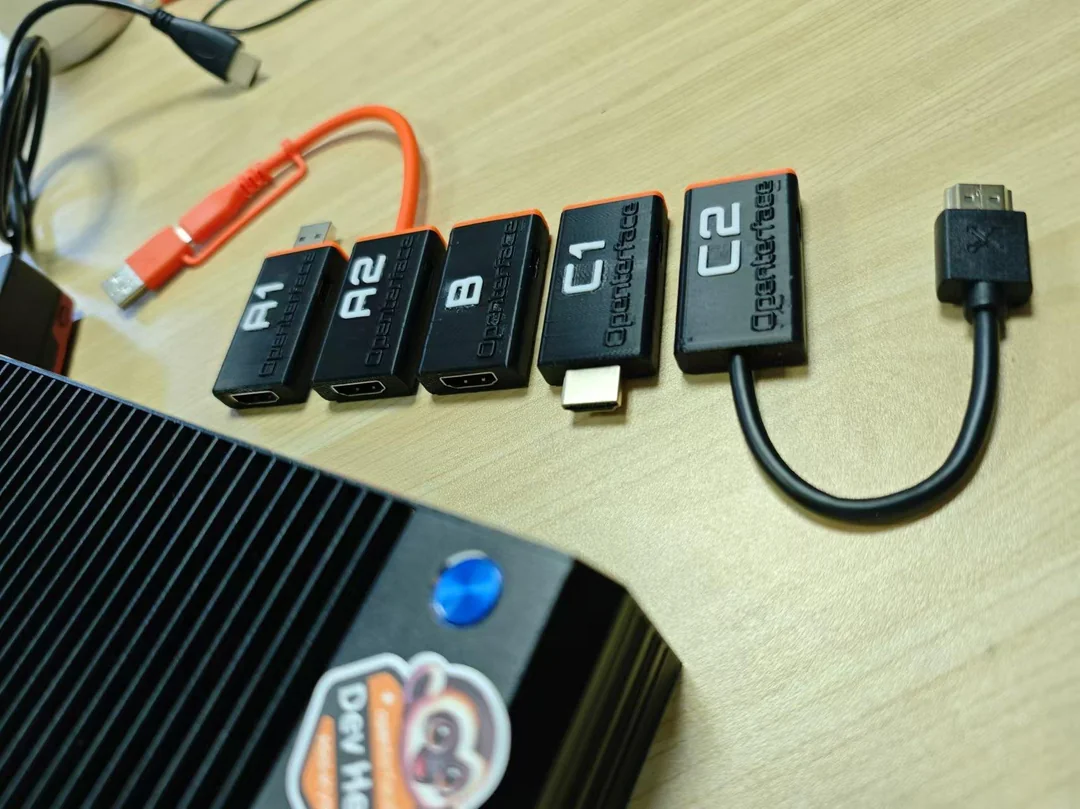
The two main directions were:
1. Cable-based, modular design Using an HDMI socket port and standard cables that users already own.
- Pros: maximum flexibility, easy cable replacement, adapts to almost anything
- Cons: users must find or carry the correct video cable, which slows down urgent tasks
2. Plug-in style with built-in plug connectors A dongle-like tool that plugs directly into the target without a separate video cable.
- Pros: “plug and go” speed, ultra-fast setup, fewer items to carry, ideal for crash-cart and emergency use
- Cons: less flexible, fixed connector type, not suitable for every scenario
We also ran a community poll on Reddit. Here were the results from the homelab community:
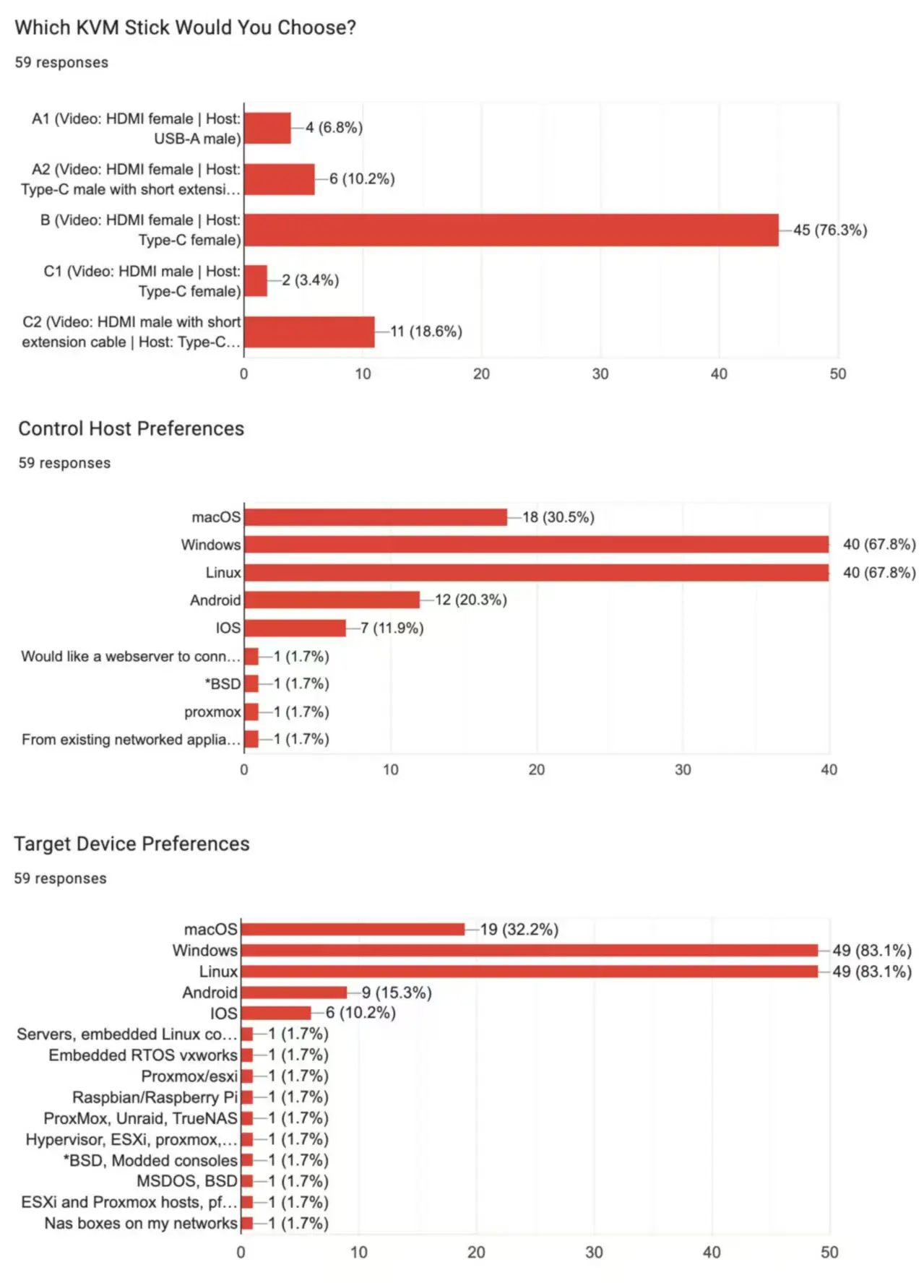
Most people preferred the highly flexible, modular “Option B” layout. That matched perfectly with the Mini-KVM design, which had already proven itself with real users. Many Mini-KVM owners love its flexibility, and this poll confirmed again that we got that format right.
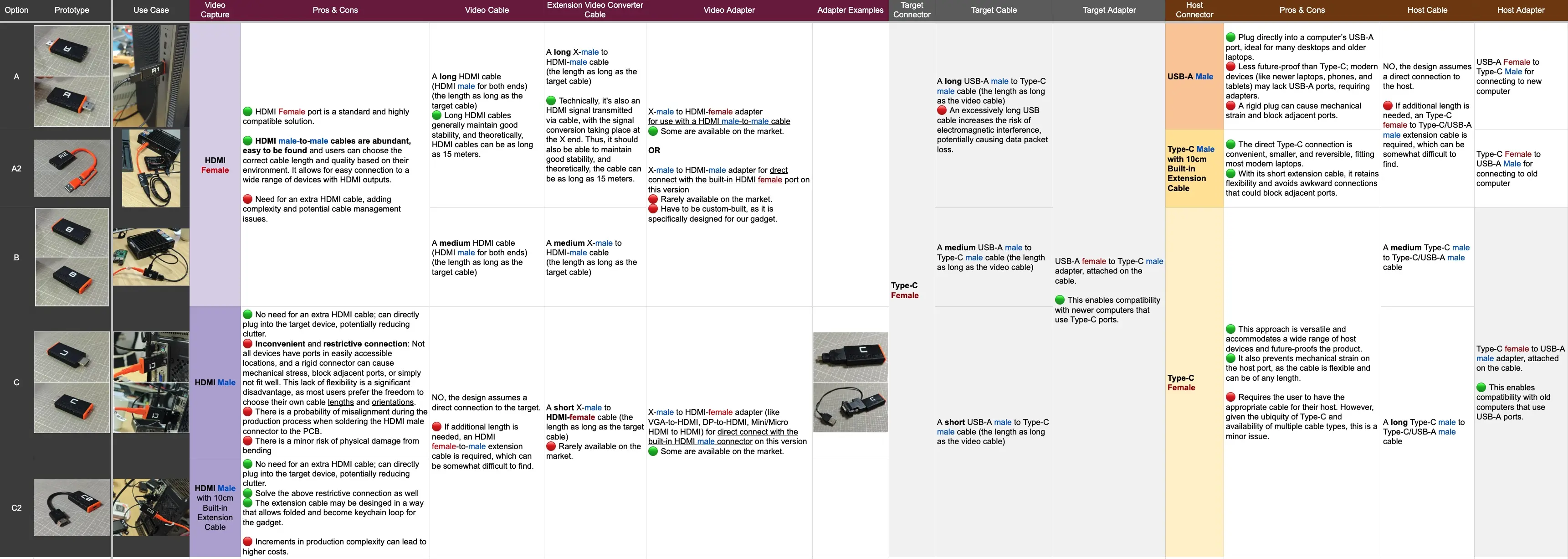 We compiled these options in a detailed comparison sheet with pros/cons, cable scenarios and trade-offs.
Why KVM-GO Is Different
Choosing Speed, Portability and Simplicity
When we began working on what we first called “Mini-KVM Lite,” the plan was simple: a minimal KVM-over-USB device that was compact and functional. As development progressed, we realised we could push this idea much further. Not only could we shrink the design, we could also integrate a real 4K chip, Bluetooth, and a microSD reader/writer.
The project quickly grew beyond “Lite,” and the name KVM-GO captured the spirit of what we wanted to build for people solving problems in critical moments.
Instead of maximising flexibility like the Mini-KVM, we prioritised:
- portability
- plug-and-play speed
- instant usability
We know this format will not be everyone’s favourite, and that is completely OK. This is not a one-size-fits-all solution.
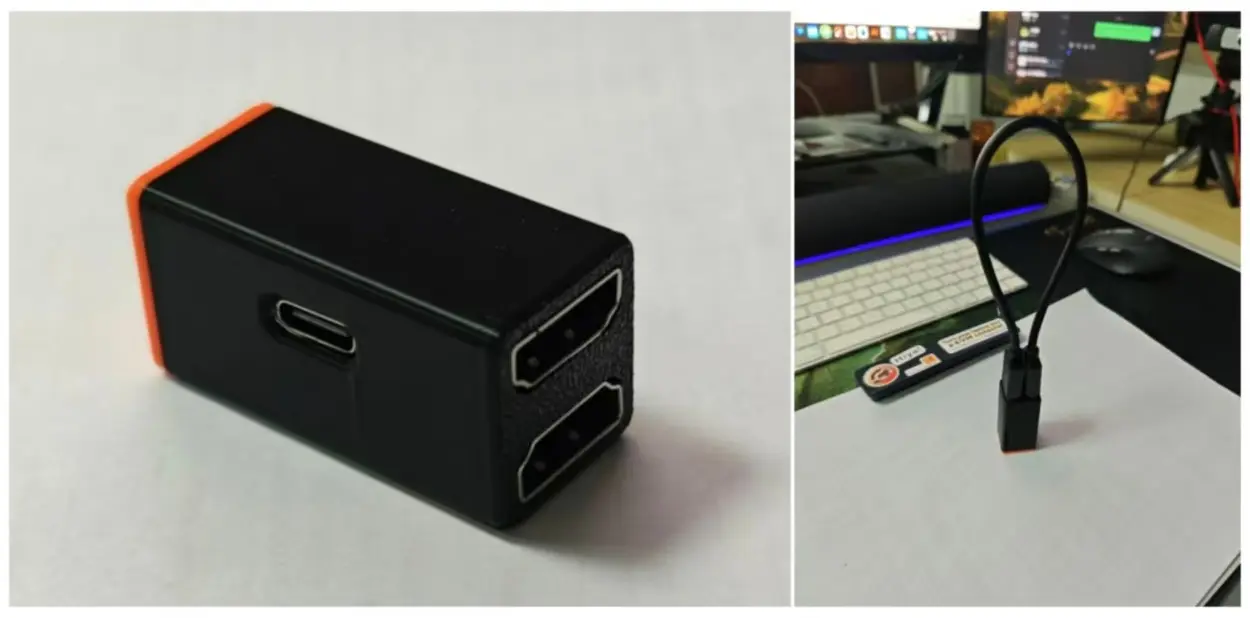
Back in late 2024, this was also one of the early design explorations that helped shape the keychain-sized direction of KVM-GO and pushed us to rethink modularity, durability, usability and real-world constraints.
What drove the decision:
- In many real-world situations such as crash-cart work, datacenter racks, field repairs, emergency access or mobile engineering, people do not want to search for a video cable. They want to plug in and take control immediately.
- A built-in plug video connector removes that friction. Users still need two USB-C cables (one for host and one for keyboard/mouse injection), but USB-C cables are everywhere today. Eliminating the need for a video cable significantly reduces setup time.
- This choice sacrifices flexibility. There are fewer adapter and cable options. Even so, many users working under time pressure prefer the instant “ready-to-go” convenience.
- Some of our users operate in unusual or extreme environments such as repairing telecom towers, working with public safety equipment, or debugging racing-car edge computers. They repeatedly tell us that speed matters more than configurability.
- For users who want maximum flexibility or support for rare video setups, Mini-KVM remains our main solution. KVM-GO does not replace it. These two devices complement each other.
Even though the poll strongly leaned toward modularity, we chose a different direction for KVM-GO after studying the niche scenarios where speed is more valuable than configurability. The world needed a second format, not just a repeat of Mini-KVM.
KVM-GO Is More Than Just a Stick
Upgrades Beyond the Form Factor
The physical layout is only one part of the story. Throughout development, we upgraded almost everything inside the device.
- Software support now extends far beyond macOS and Windows. KVM-GO works with multiple Linux distros, Android, iPadOS and Bluetooth keyboard/mouse on iPad. There is active community interest in a web-app version as well.
- The old switchable USB port was replaced with a switchable microSD slot that mounts to either host or target. KVM-GO can now replace the microSD reader in your bag, and also removes the need to carry a separate USB video capture device for basic tasks.
- We added a much more powerful video-processor chip that outputs true 4K. Many competing devices advertise “4K” but only support 4K input while outputting 1080p. KVM-GO provides real 4K output.
- High performance in a compact body created a new challenge: heat. The density is high, and we are fine-tuning the cooling system through active stress testing.
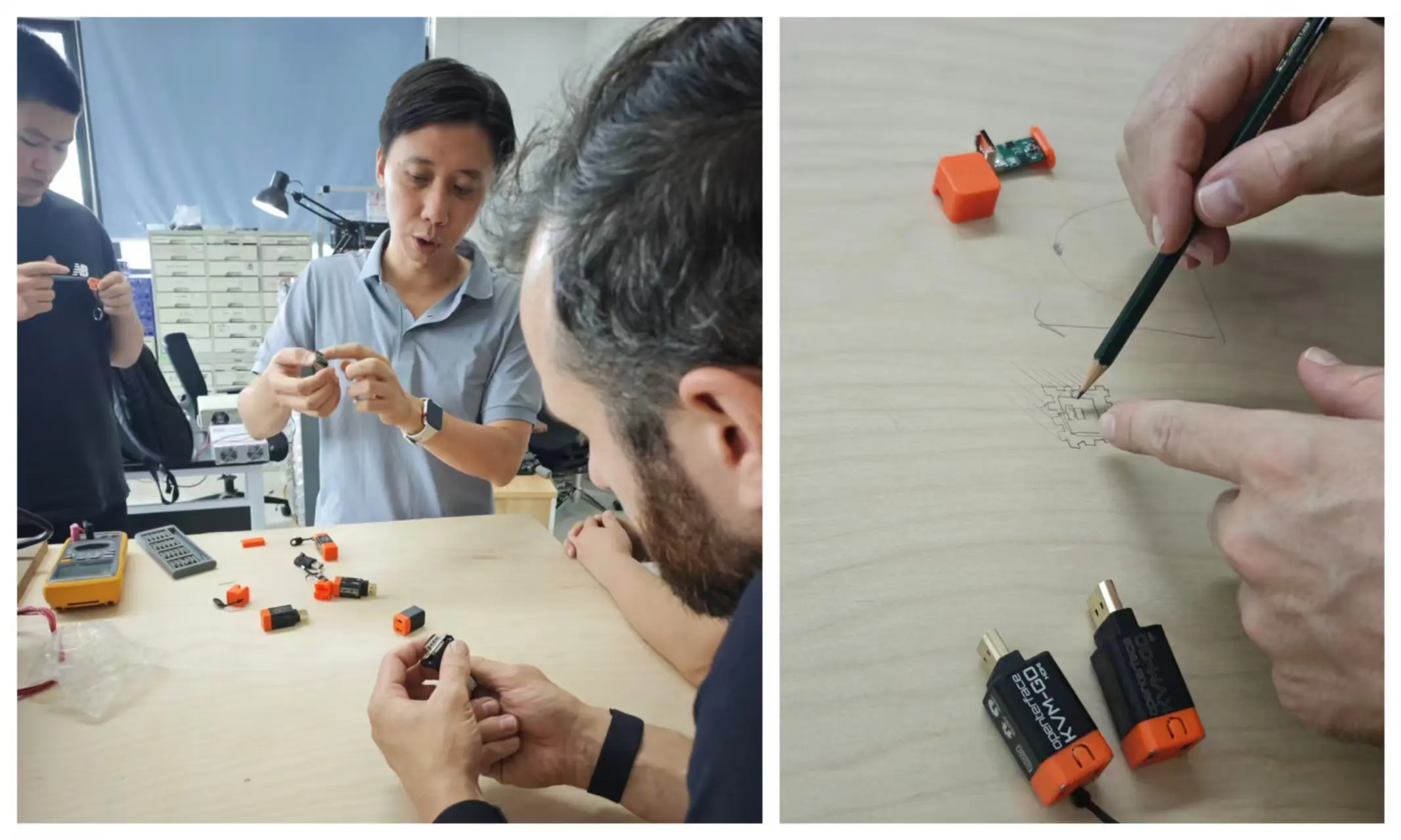
Kevin reviewing thermal tactic with Ryan Dunwoody from Powerhouse Engineering. Ryan’s experience has been invaluable. Packing real 4K performance into such a tiny body introduced unexpected heat-density issues, and he helped us rethink airflow, copper layout, heat spreading and long-term reliability. Thank you, Ryan, for the early guidance.
Together, these upgrades turn KVM-GO into a portable, future-ready, always-ready tool.
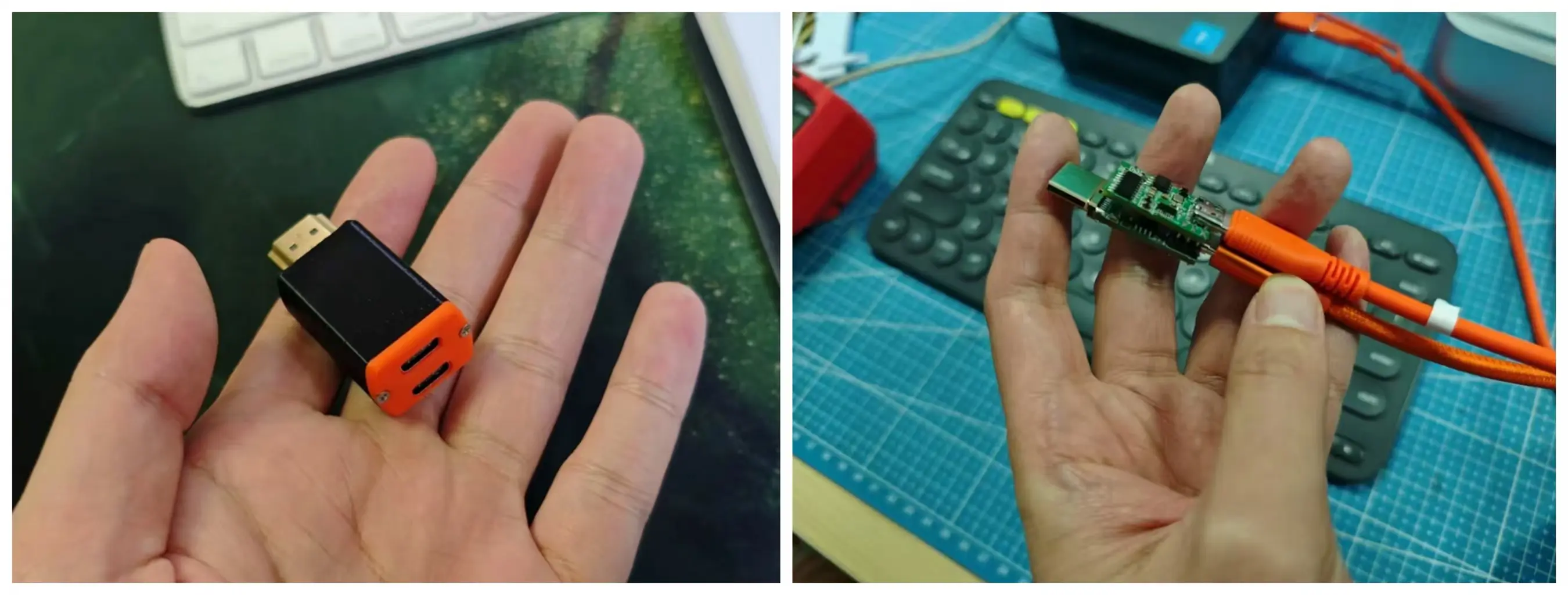
Here is one of the earliest KVM-GO prototypes, just a bare PCB in hand. Rough and tiny, but it proved the idea had real potential.
What This All Means
Our goal with KVM-GO was to create a tool that feels almost invisible when you need it. You take it out, plug it in, and instantly take control. No video cable scavenger hunt. No “I forgot the HDMI adapter at home.” Just instant access.
KVM-GO is a portable, 4K-capable, multi-OS, crash-cart-friendly KVM-over-USB solution, built for real users and real scenarios.
Some people will continue to prefer maximum modularity. That is exactly why Mini-KVM exists. (And yes, you can still buy it now… wink wink :D)
But for travel, datacenter work, maintenance on the road, or emergency debugging, KVM-GO might be the format that hits the sweet spot.
Thank You
And What’s Next
Thank you to everyone who joined the Reddit discussion, filled in the poll, shared feedback and asked tough questions. Without your input, we might have kept chasing perfect modularity rather than focusing on what many users genuinely need.
We are continuing to refine both hardware and software. More updates will follow. If you have thoughts or suggestions, feel free to email us at support@openterface.com or join our Openterface Discord. We read every message.
If you like what we are building, please consider backing KVM-GO and helping us spread the word. Sharing the campaign with a friend or community makes a huge difference for a tiny team like ours. We are building this for you, and because of you.
Openterface / TechxArtisan Team